


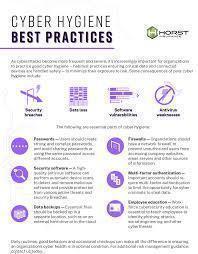
In today’s digital-first world, where online classes, emails, cloud storage, and learning apps are the norm, maintaining cyber hygiene is just as important as personal hygiene. Whether you're a student or an educator, practicing good cyber hygiene helps protect your data, devices, and privacy.
Cyber hygiene refers to the daily habits and best practices that help individuals and organizations stay safe online. It’s about being aware of potential threats and taking proactive steps to prevent them — just like brushing your teeth prevents cavities!
📚 Students are constantly online — attending virtual classes, submitting assignments, using apps, and browsing the web.
👩🏫 Educators manage student data, access institutional platforms, and communicate via emails and LMS (Learning Management Systems).
Both groups are prime targets for cybercriminals because educational systems often store valuable personal and academic information.
Avoid using "123456", "password", or names/pets.
Use a password manager to keep track of different passwords.
Change your passwords regularly — at least every 3-6 months.
Adds an extra layer of protection beyond just a password.
Common in Google, Microsoft, Zoom, Moodle, etc.
Use SMS, email codes, or authenticator apps like Google Authenticator.
Don’t click on suspicious links or attachments from unknown senders.
Watch out for phishing emails pretending to be your school or bank.
Check URLs before logging into any platform.
Regular updates fix security bugs.
Update your OS, browsers, antivirus, Zoom, MS Office, etc.
Install reputable antivirus software on all devices.
Enable your device's built-in firewall to block suspicious activity.
Use cloud storage (Google Drive, OneDrive) or external drives.
In case of ransomware or device failure, you won’t lose your work.
Public Wi-Fi is often unsecured.
Use a VPN if you must access academic accounts on public networks.
Review what permissions each app has (camera, location, contacts).
Don’t give more access than necessary.
Especially on shared or public computers.
Clear browsing history and cookies if you’re on a public device.
Attend webinars or courses on cybersecurity basics.
Encourage peer-to-peer learning and report suspicious activity early.
Use institution-approved platforms only.
Don’t store sensitive student info on personal devices.
Regularly audit digital tools for privacy compliance (especially in K-12 environments).
| ✅ Task | 🔁 Frequency |
|---|---|
| Update passwords | Every 3-6 months |
| Backup files | Weekly |
| Update software | As soon as updates are available |
| Review app permissions | Monthly |
| Scan for malware | Weekly |
| Attend security training | Every semester |
Practicing cyber hygiene doesn’t have to be complicated. A few small habits can make a big difference. By staying vigilant and informed, both students and educators can protect themselves and their learning environments from cyber threats.
#trending #latest

University Internships That Help You Get a Job After Graduation... Read More.

Is It Smarter to Start at a Community College... Read More.
 Fake posts hit Czech PM Fiala's X
Fake posts disrupt Czech PM Fiala's X account security
 Switzerland Tightens Export Rules
Switzerland expands export controls on dual-use goods
 Google unveils Ironwood AI chip
Google introduces Ironwood chip to accelerate AI tasks & apps
 TSMC Q1 revenue up 42%
TSMC sees 42% revenue surge in Q1, surpassing forecasts
 Amazon CEO Outlines AI Vision
Amazon CEO reveals AI investment plans in new letter
 Osaka Hosts World Expo 2025
Japan blends tech and culture at Osaka Expo 2025 launch
 A16z Plans Big Bet on AI Startup
A16z may lead huge round in ex-OpenAI CTO’s new AI firm.


© MyEduGoal. All Rights Reserved. Design by markaziasolutions.com